Most people collect free networking tools like browser tabs.
Five apps to decide what to post, write it, schedule it, and figure out who engaged.
Then they do the weird part, they never message anyone.
This post is your shortcut.
evyAI has 80+ free networking tools in one place that cover the whole path, from idea to post to conversation.
- Free
- No login
- No credit card
- No trial
- All in your browser at evyus.com/tools
PRO TIP: Do not start by browsing tool names. Start by typing your goal into the search box, like “write a hook about onboarding” or “what should I message someone who liked my post.”
What Are evyAI’s Free Networking Tools?
evyAI’s free networking tools are a collection of 80+ browser-based utilities.
They help you decide what to post, write it, schedule it, review results, save the people who engage, and start conversations with them, with no login required.
These tools are separate from the evyAI Chrome extension and the evyAI web app.
Many of the tools can hand their output to the evyAI Agent with the prompt already written, and that handoff requires an evyAI account.
Also, the search box is surprisingly smart.
Search by goal, not by name. Try things like:
- “find out what my buyers struggle with”
- “rewrite this post with a better hook”
- “turn commenters into conversations”
Why Are These Networking Tools Free?
We built evyAI around one simple belief: automate your tech, not your relationships.
So we give away the mechanics.
The prompts. The frameworks. The little utilities that remove friction.
Because when the busywork is gone, you can do the human part, which is showing up, being consistent, and starting real conversations.
If you want the philosophy behind that, read: Automate Your Tech, Not Your Relationships.
How to Use Free Networking Tools to Go From Post to Conversation
Most “tool lists” dump a pile of apps on you and call it a day.
These free networking tools work differently.
Most of them pass their work to the next tool with one button.
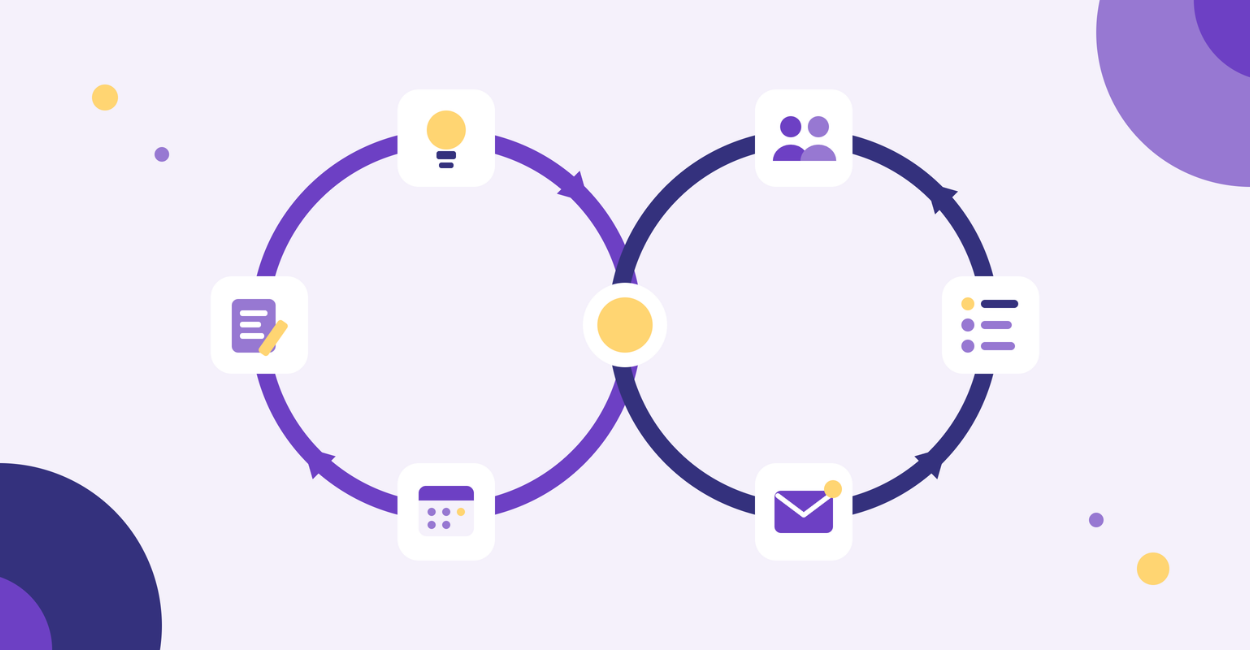
Together they form two loops: one for your content and one for your relationships.
The Content Loop: From Idea to Post to What Worked
- Pick the topic: Problem Discovery gives you a bank of buyer pains in their own words. Question Discovery finds the real questions people ask. Trend Finder shows whether interest is rising or falling.
- Write the first line: Hook Lab builds your opener, then starts the post or schedules it.
- Make the piece: use the Post Editor for text posts, the Carousel Maker for document posts, and Story Finder to surface stories you already have.
- Schedule it: the Content Calendar pulls in drafts from the other tools and tracks your posting streak.
- Learn what worked: the My Posts Analyzer shows which openings, formats, lengths and days perform best. It saves your winning first lines back to Hook Lab, so the loop starts again with better material.
The Relationship Loop: From Likes to Real Conversations
Engagement isn’t the goal. Engagement is the list of people you should talk to.
- Save who showed up: the Engagement Saver and Comment Saver turn the people who reacted to or commented on a post into a table with their profile links.
- Track who keeps showing up: Add to Warm List sends them to the Warm List. It merges the same person across posts, scores how warm they are, and suggests your next move.
- Start the conversation: write a message that builds on your history with that person, and send it yourself.
- Track the outcome: mark people as Messaged, Replied or Meeting booked. Warm List sets the next follow-up date, and the loop restarts.
This loop follows the Greeting → Feeding → Meeting method: say hello with no ask, offer value, then earn the meeting.
For help with what to say, start here:
Tool Categories: 80+ Free Networking Tools, By Goal
Now, here is how I would think about these free networking tools.
Not by tool name.
By outcome.
Free Networking Tools for Content Ideas
Use these when you need a topic, an angle or a story:
- Problem Discovery: your buyers’ pains, in their own words
- Question Discovery: real questions people are asking
- Trend Finder: whether a topic is heating up or cooling off
- Story Finder: stories from your own experience that you forgot you had
Free Networking Tools for Hooks and Scroll-Stopping Openers
Hooks decide whether people read the rest.
Most people write the hook last, then wonder why the post flops.
Hook Lab builds first lines for you. Your best performers come back to it automatically from the My Posts Analyzer, so your hooks get better every week.
PRO TIP: Generate 10 hooks, pick the most polarizing one that’s still true, then write the body to earn it.
Free Networking Tools for Writing, Formatting and Repurposing Posts
This is where evyAI’s free networking tools save you the most time:
- Post Editor: writes and formats text posts, and can turn a post into a carousel
- Carousel Maker: builds document posts
- Make Text Bold: styled text that works in posts, headlines and comments
- Markdown Cleaner: strips the markdown out of AI output so your bold text actually shows on LinkedIn
- Style Creator: ready-made writing styles for LinkedIn, email, X, Facebook, Skool and Substack
- Collage Maker: collages sized for posts, banners, carousels and stories, plus an animated GIF mode
- Video to Image Gallery: pulls still frames from a video, so one recording becomes a week of image posts
If you want the repurposing workflow, use this: LinkedIn Content Repurposing Workflow: 1 Idea to 10 Posts in 30 Minutes.
Free Networking Tools for Scheduling and Reviewing Results
- Content Calendar: plan your week, pull in drafts from the other tools, and keep your streak alive
- My Posts Analyzer: see which openings, formats, lengths and days work best. It can also add a sequel to your calendar and plan next week.
If you want the daily habit behind it, this is worth reading: 10 Proven Ways to Get More Post Engagement and Grow Your Professional Brand.
Free Networking Tools for Turning Engagers Into Conversations
Comments are networking.
Good comments are relationship deposits, and these tools make sure none of them get lost:
- Engagement Saver and Comment Saver: turn a page of people into a spreadsheet
- Warm List: score warm contacts, suggest your next move, and set follow-up dates
- LinkedIn Connections Analyzer: see who’s already in your network
Free Networking Tools for Your Profile, Bios and First Messages
If your connection request says “I’d like to add you to my professional network,” you’re not networking.
You’re collecting.
Get your story straight first:
- LinkedIn Profile Roaster: honest feedback on how your profile lands
- Networking Templates: 14 bios, pitches and emails written from one profile
- AI Bio Builder: drafts your bio from your website and LinkedIn
- Contact Card Maker: a digital business card people can save to their phone
For message building blocks you can reuse, check:
Free Networking Tools for Prospecting and Social Selling
There’s a whole category of free social selling tools here, without the bloat:
- LinkedIn Search Creator: builds people searches from titles, keywords, location, industry and connection degree
- Lead Calculator: works backward from your revenue goal to the clients, leads and meetings you need
- Pipeline Stage Builder and SOP Builder: turn your sales process into stages and steps you can repeat
- $100M Roadmaps: steps from Alex Hormozi’s $100M books, each linked to the free tool that helps you do it
Free Tools for Links, Files and Everyday Productivity
These are the small utilities that remove friction every day:
- Share Links for Social: one-click share links for LinkedIn, X, Facebook, WhatsApp, Telegram, Bluesky, Reddit, Threads and email
- When: Time Zone Links: shows a meeting time in each viewer’s own time zone
- Timer & Stopwatch and Soundboard: for Lives, webinars and meetings
- File converters: PDF to Text and Images, CSV Explorer, VCF to CSV, JSON to CSV and Video to GIF. All of them run in your browser, and your files are never uploaded.
Free Tools for Mindset and Media
- Belief Map: 100 beliefs that hold people back from networking, prospecting, selling and marketing
- Confidence Map: 100 beliefs about speaking, video, photos, lives, hosting and leading
- Media tools: Screen Recorder, Voice to Text, Image Studio, Video Studio and Prompt Studio
How to Make Your Free Networking Tools a Repeatable System
Your best networking is repeatable.
Not robotic. Repeatable.
- Use the same browser every time. Your drafts and lists are saved there.
- Let the tools hand off to each other. A list from one tool can go straight into the next.
- Check the What’s new page. New tools launch regularly, and you can request one or report a problem there.
FAQ
- Are these really free networking tools?
Yes. The tools on the hub run in your browser and do not require a login. Some tools can pass output into the evyAI Agent, and that step requires an account. - Do I need the extension to use the tools?
No. The hub tools are separate. The extension is how many people run evyAI inside their daily networking workflow. - What is the fastest way to get results?
Pick one posting tool and one messaging tool. Post, engage, then message the people who engage. Do not overcomplicate it. - If I get stuck, where do I get help?
Join live help. We run office hours on Zoom two hours every day, 12–1pm and 7–8pm EDT, Monday–Friday.
Try out evyAI for FREE by downloading the Chrome extension, and when you are ready, upgrade to Premium or Pro for unlimited posts, comments, and more.