
Not an evyAI Affiliate?
Thank you for sharing evyAI, the sales assistant that helps you create personalized comments, write posts, and reply to DMs.
We’ve made swipe copy for you (below) to make it easy to share about evyAI with your network!
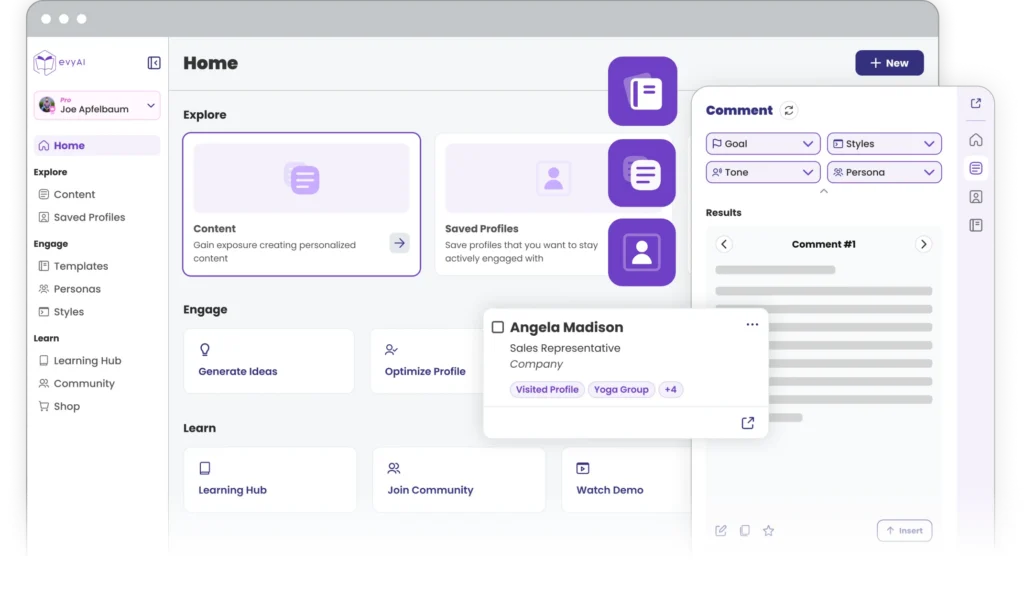
With evyAI, you can create engaging content online in minutes, without spending hours researching or crafting the perfect post.
evyAI helps you optimize your posts and profile, allowing more people online to notice you, increasing your job and networking opportunities.
evyAI's intelligent recommendations and comments help you establish yourself as an expert in your field, boosting your credibility and authority.
Help us spread the word about evyAI! Use the shareable content below to offer this sales assistant to your network.
For related social media image, click here.
Copy Below:
Most people think evyAI is just for LinkedIn.
It’s not.
It’s actually a side panel Sales assistant that sits in your browser and helps you:
It’s closer to a sales + content assistant than just a writing tool.
#SalesTools #AIforBusiness #evyAI
For related social media image, click here.
Copy Below:
Before you message someone… do you actually research them?
evyAI helps you:
✔ analyze profiles
✔ enrich insights
✔ understand who you’re reaching out to
So your messages feel relevant, not random.
Better context → better conversations.
#AItools #Sales #Networking
For related social media image, click here.
Copy Below:
evyAI isn’t just for LinkedIn.
It helps you:
• research people
• save profiles
• draft content
• write messages
Think: Sales assistant inside your browser.
#AI #SalesTools
For related social media image, click here.
Copy Below:
Before sending a message, do you research the person?
evyAI helps you:
✔ analyze profiles
✔ enrich insights
✔ write smarter outreach
#Outreach #AI
For related social media image, click here.
Copy Below:
Struggling to sound like you on LinkedIn?
evyAI Styles helps you:
✔ match your unique voice
✔ stay consistent across posts
✔ write faster without losing personality
👉 evyai.com/evyai-styles-ai-content/
#AI #ContentCreation #LinkedInTips
For related social media image, click here.
Copy Below:
evyAI = more than writing
You can:
• save profiles
• organize contacts
• generate images
• create content
All in your browser.
#AIassistant #ContentCreation
For related social media image, click here.
Copy Below:
Writer’s block is just friction.
evyAI removes it by giving you a starting draft for anything: posts, messages, emails, comments.
#AIwriting #Productivity
For related social media image, click here.
Copy Below:
You don’t need more ideas…
You need a faster way to turn ideas into content 💡
evyAI helps you:
✨ draft posts
✨ write messages
✨ generate content
All from one place.
#evyAI #ContentCreation #AItools
For related social media image, click here.
Copy Below:
Still switching between tools for:
📝 writing
🔍 research
💬 messaging
evyAI brings it all together in one assistant.
Less switching. More doing.
#Productivity #AItools #evyAI
For related social media image, click here.
Copy Below:
Better outreach starts with better context 👇
evyAI helps you:
✔ research people
✔ understand profiles
✔ personalize messages
No more generic outreach.
#Sales #Networking #evyAI
For related social media image, click here.
Copy Below:
This is NOT automation 🚫
evyAI doesn’t post or message for you.
It helps you:
✔ draft faster
✔ stay consistent
✔ stay in control
#AIforBusiness #PersonalBrand
For related social media image, click here.
Copy Below:
Content + research + messaging…
In one place.
evyAI = your Sales assistant inside your browser.
#AIassistant #evyAI #Workflow
Subject Line A: “A simpler way to stay consistent“
Subject Line B: “Stop starting from scratch”
Preheader Text: Draft content, messages, and more faster
Copy:
Hi [Recipient’s Name],
Most people don’t struggle with ideas.
They struggle with execution.
Writing, researching, messaging, it all takes time.
That’s why I started using evyAI.
It’s a browser-based Sales assistant that helps you draft content, research people, and write messages, all in one place.
You still edit and publish everything.
It just gives you a starting point.
Best,
[Your Name]
Subject Line A: “Where evyAI actually helps”
Subject Line B: “Make your workflow easier”
Preheader Text: Content, research, and outreach together
Copy:
Hi [Recipient’s Name],
What makes evyAI useful isn’t just writing.
It’s everything around it.
You can:
Without jumping between tools.
It’s a simpler way to stay consistent.
Best,
[Your Name]
Subject Line A: “This is NOT automation“
Subject Line B: “Why evyAI feels different“
Preheader Text: You stay in control, AI just helps you write faster
Copy:
Hi [Recipient’s Name],
Before trying evyAI, this was my biggest question:
“Is this another automation tool?”
Short answer: no.
evyAI doesn’t post, message, or interact on your behalf.
Instead, it works as a writing assistant, helping you draft content that you can:
✔ review
✔ edit
✔ personalize
✔ publish yourself
That’s an important difference.
You stay in control of everything, evyAI just removes the friction of starting from a blank page.
If your goal is to:
…it’s a very practical tool to add to your workflow.
👉 You can try it here: evyai.com
If you do check it out, I’d love to hear what you think.
Best,
[Your Name]
Headline: Your Sales Assistant in Your Browser.
Body:
Content, research, outreach, it all takes time.
evyAI helps you:
All from one place.
CTA: Try evyAI → https://evyai.com/
Headline: Stop Switching Between Tools
Body:
Writing, research, messaging…
evyAI brings it all together so you can move faster and stay consistent.
CTA: See How It Works → https://evyai.com/
Link: https://evyai.com/
Sales assistant, content writing tool, AI for outreach, AI productivity tool, sales assistant AI, content creation tools, outreach tools, workflow tools
Click here for Blog Header Image
Title: evyAI as a Sales Assistant
Meta Description: Why Content and Outreach Feel Harder Than They Should.
Focus Keyword: evyAI
Click here for Mobile Image
Click here for Desktop Image
Body Copy:
Why Content and Outreach Feel Harder Than They Should
LinkedIn and other platforms are powerful for building your professional presence.
But most people don’t struggle with ideas.
They struggle with:
And when time is limited, these are usually the first things to fall off.
That’s where tools like evyAI come in.
What evyAI Actually Does (And What It Doesn’t)
evyAI is a Chrome extension that works from a side panel in your browser and helps you:
It’s important to understand this: evyAI does not post or send messages for you.
It gives you a starting draft so you can:
Think of it as an assistant that supports your workflow, not an automation tool.
Beyond LinkedIn: evyAI as an Assistant
While many people start using evyAI for LinkedIn, it works across your browser.
You can use it for:
It becomes a lightweight assistant that supports content, sales, and communication tasks in one place.
Step 1: Start With Your Profile
Your LinkedIn profile is often the first impression people get.
Instead of treating it like a resume, think of it as your personal landing page.
Focus on:
Headline
Go beyond your job title. Highlight what you do and who you help.
About Section
Make it clear, human, and easy to read. Share what you do, your experience, and what people can expect from you.
Experience
Focus on outcomes and impact, not just responsibilities.
If you’re not sure how to phrase things, evyAI can help you draft profile sections faster so you’re not overthinking every sentence.
Step 2: Make Content Easier to Create
Content is where most people get stuck.
Not because they don’t have ideas, but because writing takes time.
To simplify this:
The goal isn’t perfection. It’s consistency.
evyAI helps by giving you a first draft based on your idea, so you’re not starting from zero every time.
You can also:
Step 3: Use Comments to Stay Visible
You don’t have to post every day to grow.
Comments are one of the fastest ways to:
Instead of leaving generic replies, focus on:
If you ever feel stuck, evyAI can suggest comment drafts based on tone, intent, or context.
Step 4: Improve Your Messages and Connections
Outreach often falls into two extremes:
A better approach is simple:
Be clear, relevant, and human.
Before reaching out, evyAI helps you:
Then helps you draft messages that feel natural and personalized.
Step 5: Focus on Consistency (Not Volume)
You don’t need to post every day to see results.
What matters more is:
The real challenge is not strategy, it’s execution over time.
That’s where having an assistant that reduces friction makes a difference.
Using evyAI as Part of Your Workflow
A simple way to use evyAI:
That’s it.
No complicated system.
No pressure to do everything perfectly.
Just a faster, more organized way to stay active.
Final Thoughts
Building visibility and relationships online doesn’t require more complexity.
It requires consistency.
If writing, researching, and organizing your outreach are slowing you down, evyAI can help you:
And over time, that’s what creates opportunities.
👉 You can try evyAI here: evyai.com
“This AI tool helps and makes me comment easier with just 3 clicks. It’s very helpful, especially for busy people who still want to maintain their connections on LinkedIn. I highly recommend using this time-saving tool.”
“evyAI has been an incredibly useful tool for me on LinkedIn. It has increased my engagement tenfold, helped me write thoughtful recommendations for those in my network, crafted excellent connection request notes, and assisted me in creating a perfect about section. I use evyAI every day and am very grateful for its creation.”
“evyAI has been an excellent assistant for my writing, and I am only using 5% of its potential. I am very pleased thus far and hope to use more in the future. My ideas are taken and using my persona, it does incorporate my general message and my philosophy into the posts. Thanks, Joe, for always being creative and bringing tools that help busy entrepreneurs. Boom.”
“Incredible productivity gain using evyAI! It has given me the ability to quickly and timely produce posts, comments, and responses in my LinkedIn community. I use it every day and would be lost now without it.”
“I’ve been using evyAI to write comments for me on LinkedIn – it’s a life-saver! I used it to help me get a top voice badge with contributed articles – highly recommend this tool.”
“During the last 3 months, my ghostwriting has been enormously aided by Joe Apfelbaum’s creative solution evyAI. For posting, I use evyAI extensively for 1st drafts and then I edit to fit my tone and style. BUT, even more important to me is the “commenting” capability, because I consider commenting the key factor in building interest and trust.”
“In the rapidly evolving landscape of Information Technology, staying ahead of the curve is crucial. evyAI emerges as a game-changer, seamlessly integrating artificial intelligence to not only enhance efficiency but also foster trust in a way that sets it apart from its counterparts. My LinkedIn journey has never been so easy and more importantly, so powerful.”
“This is the best AI tool I have found for use in my coaching business. I can easily personalize connections and comments, which saves me so much time and triples my productivity on LinkedIn. I always make the comments “my own” so I never feel like I am not connecting authentically, just saving precious time and team resources. Thanks for creating this.”
“evyAI seamlessly integrates with my workflow, significantly cutting down the time I spend on LinkedIn. Its standout feature is the “command” function for customization of prompt, a unique offering unmatched in the market (I tested all other tools). Plus, the ‘save profile’ capability truly elevates my networking strategy.”
“I admit I have avoided AI like the plague because of privacy issues and because the few I tried were a waste of time. I have found one that’s smart enough not to actually need a lot of rewriting, hallelujah! Also, the privacy issues are nonexistent–your information is well protected. Just wrote a post on LI that took under a minute. Highly recommend it if you’re looking for reliable AI.”
Marcy McDonald
“I absolutely love this tool. I had been eyeing another similar product and I am glad I waited and found this one because the functionality is incredible. I love the persona feature, the profile saving, profile summary, and the post writer. What I really love is that it is a tool that helps me, not something I resign myself to. The team is also awesome and was very prompt to help me with an issue I was having. I highly recommend this tool.”
Marjorie Prat
“Amazing tool to quickly and easily stay connected with prospects and profiles I care about. Highly recommend it!”
“This tool makes keeping updated with my prospects almost effortless and, more importantly, allows me to connect with folks 3x faster. Highly recommend it to those who feel that LinkedIn is essential.”
“Makes everything effortless on LinkedIn. For me, even more compelling is evyAI’s CRM capabilities which LinkedIn has desperately needed. The free version alone is a steal in terms of value.”
“evyAI is a phenomenal tool. I’ve learned more about AI from Joe than from any other source. Joe created evyAI, and it’s fantastic. You can train it to sound like you! The more you use it, the better it gets.”
“This is an awesome tool for anybody who wants to leverage LinkedIn. I just started using this tool today and received very positive feedback from a comment I left on an influencer post, who I never hear from. Keep pushing your boundaries further forward!!”
“evyAI is a game changer! It removes the main hurdle to LinkedIn engagement. It helps create content from scratch and then all you have to do is edit – and even that is optional!”
“I don’t have writer’s block and was resistant to getting evyAI. I was using the free version and wasn’t impressed. After 3 months, I got the upgraded version and everything changed. I created a few Personas and with GPT 4, the quality of the comments to post just exploded and I get responses much more than before. This tool saves me so much time in commenting on far more posts than before.”
“In the past 7 days, I’ve seen a more than 1800% increase in post impressions and a 30% increase in followers. This is a great tool that will save you time and help you get more eyeballs on your business.”
“This AI tool is one of the coolest chrome extensions I have ever seen. It frees up my time and allows me to stay top of mind with my LinkedIn connections all in one. Highly recommend it!”
“evyAI is a great AI tool to help you be productive in your LinkedIn content strategy, while saving you a lot of time. And it is easy to use with very little learning curve. Just add the chrome extension and start using. Highly recommend it.”
“I always knew that I needed to get much more engaged on LinkedIn. Frankly, I struggled with coming up with more than a few meaningful words when commenting. I also struggled with creating meaningful and engaging posts. evyAI has solved those struggles of mine. I would HIGHLY recommend this platform. You CAN do it and evyAI makes it easy.”
“evyAI is saving me so much time and energy! Thanks for making a really smart tool to help us solopreneurs get more stuff done and do it so well. My account continues to grow and my following has hit over 4K (that’s a 30% increase!).”
“Saw a demo of this tool and grabbed it before he was done talking! It installs easily and works smoothly and it’s going to save lots of time on my LinkedIn networking.”
“This is a game-changer and saves me so much time! Highly recommend it!”
“Graceful and quick! Nicely designed AI tool to make your LinkedIn presence MUCH more efficient and effective. Thanks for helping us all to up our game!!”
“Wow! I didn’t realize that this app could be so amazing. But its ability to generate thoughtful comments is mind-blowing. Plus, the ability to give it prompts makes it a fantastic AND flexible tool.”
“This app is a game changer! It allows me to write meaningful and engaging comments even when I don’t have time to fully consume the post. My comments are getting more replies and likes! Love it. Boom!”
“This is an amazing extension! Works so easily and provides quality results. So many options from optimizing profiles, to asking questions, sending connection requests and more! So so good! I use it for myself and for my clients…and you can hand it over to your VA and other employees.”
“Incredible! Relatively new to AI and evyAI makes learning AI simple and incredibly effective!”
“I have been using this tool heavily recently. It saves so much time!”
“Amazing product! Saves me a ton of time and energy, plus it helps me connect to new folks with ease.”
“Very good tool and I find this helpful.”
“Very easy to learn and use – that was key for me. Of many AI apps I use, for the price, it was a no-brainer. It is helping me up my game on LinkedIn for sure!”
“LOVE THIS! I wasn’t sure if I would use it, but was so easy to learn, I immediately spent an hour working on my LinkedIn presence. For anyone looking to nurture their LinkedIn presence, I’d highly recommend evyAI!”
“evyAI has been a great and useful tool for me! It takes what I want to say and improves it! It saves me lots of time and helps ensure that I sound professional and knowledgeable. Thanks evyAI!”
For related YouTube video, click here.
Copy Below:
Most people don’t struggle with LinkedIn ideas…
They struggle with consistency.
Showing up regularly, engaging, following up… it all takes time.
That’s where evyAI comes in.
It’s a side panel that lives in your browser and helps you:
All in one place.
You still review and publish everything.
It just makes it easier to stay consistent without switching between tools.
 Try evyAI at evyai.com
For related YouTube video, click here.
Copy Below:
If staying consistent feels harder than it should, this might help.
evyAI helps you draft:
So instead of starting from scratch every time, you start with a draft and make it your own.
But what makes it even more powerful…
You can train evyAI using your own writing style.
With styles and personas, you can control how your content sounds:
So everything you write stays consistent and sounds like you.
Less overthinking. More posting.
👉 Get started at evyai.com
For related YouTube video, click here.
Copy Below:
Your LinkedIn profile might be costing you opportunities… and you don’t even realize it.
Your headline, about section, and experience all matter.
evyAI helps you draft and improve your profile content so it’s clearer, stronger, and easier to read.
No guesswork.
No overthinking.
Just better positioning.
👉 Try it at evyai.com
For related YouTube video, click here.
Copy Below:
Most people don’t need more AI tools…
They need fewer tabs open.
One tab for ChatGPT, one for LinkedIn, one for prospect research, one for your notes… it adds up fast.
That’s why evyAI has a built-in AI agent.
Open it from the left menu or right from the side panel, and you can:
It remembers the context of your conversation, so you can keep refining instead of starting over.
And your past chats are saved, so you can pick up right where you left off.
All without leaving evyAI.
👉 Try evyAI at evyai.com
Start earning additional income by referring evyAI to your network today.
The evyAI™ web app, chrome extension, and website are in no way authorized by, endorsed by, or affiliated with LinkedIn™ or its subsidiaries. All references to LinkedIn™ and other trademarked properties are used in accordance with the Fair Use Doctrine and are not meant to imply that this app is a LinkedIn™ product for advertising or other commercial purposes.
“evyAI is a total Game Changer for productivity, not only on LinkedIn, which is my go-to business social media site, but also can be used for all of my other social media accounts which is amazing. I’m able to get 10x more content posted and also engage with others without spending all day. Thanks for this amazing app!”
– Rick Kloete, 5-stars